

Tip #5 Google Analytics for Healthcare Websites: A Setup Guide for Pharma and Biotech
What analytics setup does a pharma or biotech website need at launch?
Analytics sounds like a yawn until the day it’s the only thing standing between the marketing team and a real answer. Pharma website analytics is often deprioritized at early-stage companies. The reasoning sounds logical: the audience is partners, investors, and potential hires, not a broad consumer market. So why care about traffic metrics before marketing becomes a priority? The answer is that analytics baselines compound, and the moments when a company most needs the data are exactly the moments when it can no longer be collected retroactively.
What triggers pharma analytics urgency?
Analytics setup typically becomes urgent at predictable inflection points in a pharma or biotech company’s growth:
- Series B or later funding: New investor scrutiny, elevated PR profile, and increased inbound traffic from trade press.
- Phase II or Phase III data: Sharp, concentrated traffic spikes from reporters, investors, and potential partners reviewing the science.
- FDA submission orFDA submission or approaching PDUFA date: The website becomes a reference point for regulators, patient advocacy groups, and specialized media.
- IPO or S-1 filing: SEC-registered disclosure requirements raise expectations for pressroom and investor-relations measurement.
- First consumer-facing platform launch: Patient support programs, disease-awareness properties, and adherence tools bring measurement needs that corporate-only setups cannot handle.
- Commercial product launch: Full-market exposure, broad media attention, and the first sustained inbound volume worth optimizing against.
Workbox sees these inflection points cluster around funding and clinical milestones. Teams that set up GA4, Google Search Console, and Google Tag Manager before any of these events have defensible data the moment traffic arrives. Teams that wait until after a spike lose that window permanently.
The three tools: what each one does and why all three are needed
Three free tools from Google cover the measurement stack for a pharma or biotech website. GA4, Google Search Console, and Google Tag Manager together form the industry-standard Google measurement stack used across life sciences, healthcare, and B2B marketing. Each answers a distinct question, and each fails to answer the questions the others cover. A complete setup requires all three.
- Google Analytics (GA4): Answers what’s working on my site? Measures user behavior, engagement, form submissions, file downloads, and conversions once visitors arrive.
- Google Search Console (GSC): Answers how do search engines and AI tools see my site? Measures search impressions, clicks, indexing status, and technical health signals that affect visibility in Google and increasingly in generative AI tools.
- Google Tag Manager (GTM): Answers how do I manage tracking without a developer? Provides centralized deployment of analytics tags, advertising pixels, and consent logic without requiring engineering involvement for each change.
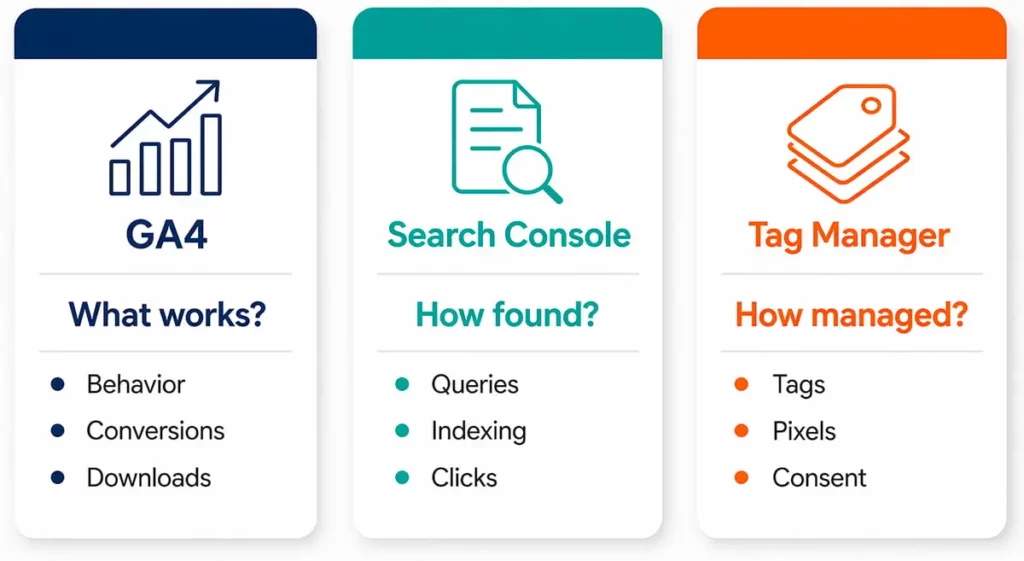
Pharma and biotech marketing teams rarely have dedicated analytics engineers. GTM exists specifically to make GA4 and GSC maintainable by a marketer or an agency.
Google Analytics (GA4): what to measure on a pharma or biotech site
GA4 answers the question what’s working on my site? For a pharma or biotech company, the useful signal is rarely raw traffic volume. It’s the behavior that indicates a valuable audience has found something worth engaging with.
Pharma-specific GA4 events worth tracking
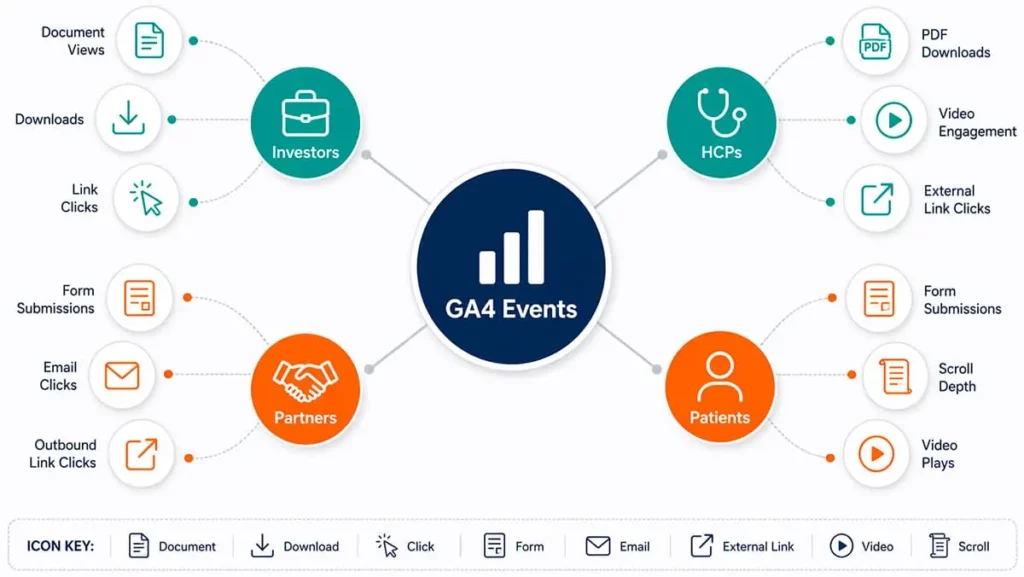
The events worth tracking on most life sciences websites include:
- Form submissions: Partnership inquiries, investor contact forms, job applications, medical information requests. Each is a high-value conversion and should fire a distinct GA4 event.
- PDF and asset downloads: Investor decks, scientific posters, publication reprints, pipeline summaries, congress materials. Downloads indicate research-grade engagement and often precede outreach.
- External link clicks: Clicks to ClinicalTrials.gov records, PubMed publications, patents, or press coverage. These signal audiences moving into the company’s scientific record.
- Scroll depth on long-form pages: Pipeline pages, science explainers, and founder biographies are often long. Scroll depth tells you whether visitors read them or bounced at the fold.
- Video engagement: For mechanism-of-action explainers or founder messages, play, pause, and completion events are more informative than pageviews alone.
GA4 also surfaces problems that would otherwise go unnoticed: traffic drops, pages that load slowly on mobile, referral sources sending bot-like traffic, and device-specific rendering issues. For a small life sciences team without a dedicated webmaster, GA4 functions as an early-warning system as much as a marketing tool.
Google Search Console: how Google and AI tools see your site
Google Search Console is Google’s free reporting tool for how the search engine crawls, indexes, and serves a website in search results. It is the only first-party source for Google’s own view of a site’s technical health and query performance.
The tool answers a different question than GA4: how do search engines and AI tools see my site? GA4 reports on what happens after someone arrives. GSC reports on how they find the site in the first place – and whether they can find it at all.
For a pharma or biotech website, GSC delivers four categories of insight:
- Real search queries: The exact phrases that generate impressions and clicks. These are often surprising. A biotech company focused on oncology may discover it receives meaningful impressions for an investigator’s name or an old conference abstract.
- Pages with high impressions but low clicks: Signals that titles and meta descriptions need rewriting. A page that shows up in search results but goes unclicked is wasted visibility.
- Indexing status: Which pages Google has indexed, which it hasn’t, and why. Technical issues like noindex tags, canonical errors, and robots.txt blocks surface here first.
- Core Web Vitals and mobile usability: Performance signals that directly affect both search rankings and how AI crawlers assess site quality.
Pro Tip: One practical constraint matters for baseline setup: GSC reports a rolling 16-month data window. Queries and impressions older than that are no longer retrievable. A site that verifies using GSC only after its first traffic spike loses that early visibility data permanently.
GSC has grown in strategic importance since the rise of AI search. Generative engines like ChatGPT, Perplexity, and Google’s AI Overviews rely on the same underlying crawl and indexing signals that GSC reports on. A site that is well-indexed and technically clean in Google is generally citable by AI tools. A site that isn’t, won’t be. For pharma marketing teams working with a pharma SEO agency, GSC is the shared source of truth.
Google Tag Manager: measurement without developer dependencies
Google Tag Manager is a free tag management system that lets marketers deploy and update analytics, advertising, and consent tags on a website without editing site code for each change.
It works as a “container,” which is a single piece of code installed once on the site that then holds and deploys every other tracking tag, pixel, and script. GTM answers the question how do I manage tracking without a developer?
For a pharma or biotech team working with an external agency or rotating contractors, GTM is the practical mechanism for retaining measurement control. Instead of filing a ticket to add a LinkedIn conversion pixel or a new GA4 event, the marketing lead adds it in GTM, previews the change, and publishes it without redeploying the site.
Four benefits matter specifically for regulated industries:
- Centralized control: Every tracking script lives in one place, with version history and rollback.
- Faster iteration New events and pixels deploy without engineering sprints or timeline dependencies.
- Cleaner measurement: Standardized naming conventions across tags reduce reporting errors and keep data dashboards consistent across quarters.
- Consent logic: GTM is where cookie-consent tools integrate with analytics and advertising tags, firing them only after user consent. This is essential for GDPR compliance in European traffic and increasingly relevant for U.S. state-level privacy laws.
The compliance question: Is Google Analytics HIPAA compliant?
Short answer: no, Google Analytics is not HIPAA compliant out of the box. Google does not sign a Business Associate Agreement (BAA) for GA4, which means GA4 cannot lawfully process Protected Health Information (PHI). The same is true of Google Tag Manager. The refusal to sign a BAA is a product policy decision. Google has chosen not to offer HIPAA coverage for GA4 as a commercial matter, not because the technical architecture prevents it. Workspace and certain Cloud services are available under a BAA; GA4 is not.
This matters specifically for pharma and biotech sites with HCP portals, patient support program portals, or any authenticated area. In those areas, identifiable health information might appear in a URL, form field, or event parameter. On a public corporate site with no PHI, GA4 is generally acceptable.
How to make Google Analytics HIPAA compliant for the parts of a site where PHI could appear.
If GA4 must be used on a site that handles PHI, the standard approach is to strip any PHI before it reaches Google’s servers:
- Remove PHI from URLs: Never include patient identifiers, email hashes, or condition names in URL paths or query parameters.
- Disable IP collection explicitly: Confirm the GA4 IP anonymization setting is active rather than relying on Google’s default assertion.
- Filter form submissions: Send only that a form was submitted as an event, not the form field contents.
- Disable Google Signals: This feature shares data with Google’s broader advertising ecosystem and should be off for any healthcare site.
- Review User-ID configuration: Do not pass any identifier that could be linked back to a patient
The question is GA4 HIPAA compliant has the same answer as is Google Analytics HIPAA compliant: no, not inherently, but GA4 can be configured to avoid processing PHI in the first place. For any site with substantial PHI exposure (patient portals, condition-specific engagement programs, HCP verification flows) the safer architecture is a dedicated HIPAA-compliant analytics platform that will sign a BAA, used alongside GA4 on the non-PHI portions of the site. Scoping this correctly is part of HIPAA-compliant web development for pharma and biotech engagements.
Pro tip: Set up accounts under a company-owned email alias
Use a dedicated email address or alias to create and manage these accounts. Something like analytics@yourcompany.com, owned by the company rather than by any individual employee.
The reason is simple: people come and go. Marketing leads leave. Contractors rotate. Agencies are replaced. When an analytics account is tied to someone’s personal work email and that person departs, the company can lose access to years of historical data. Recovering it from Google is possible but slow, and sometimes it is not possible at all.
A shared alias solves this. It can be granted to the current marketing lead, an external agency, and a backup stakeholder simultaneously. When someone leaves, access is revoked without affecting anyone else. Account ownership stays with the company rather than following an individual out the door. This is a ten-minute setup decision that prevents a one-year recovery problem.
How the three tools work together
Each tool answers a different question, and the answers build on each other:
- GSC tells you how people find you: Which queries drive impressions, which pages rank, how search engines and AI tools index the site.
- GA4 tells you what people do once they arrive: Engagement, downloads, form submissions, conversions.
- GTM makes it easy to deploy and maintain the tracking logic: Without engineering dependencies, and with consent rules applied consistently across all tags
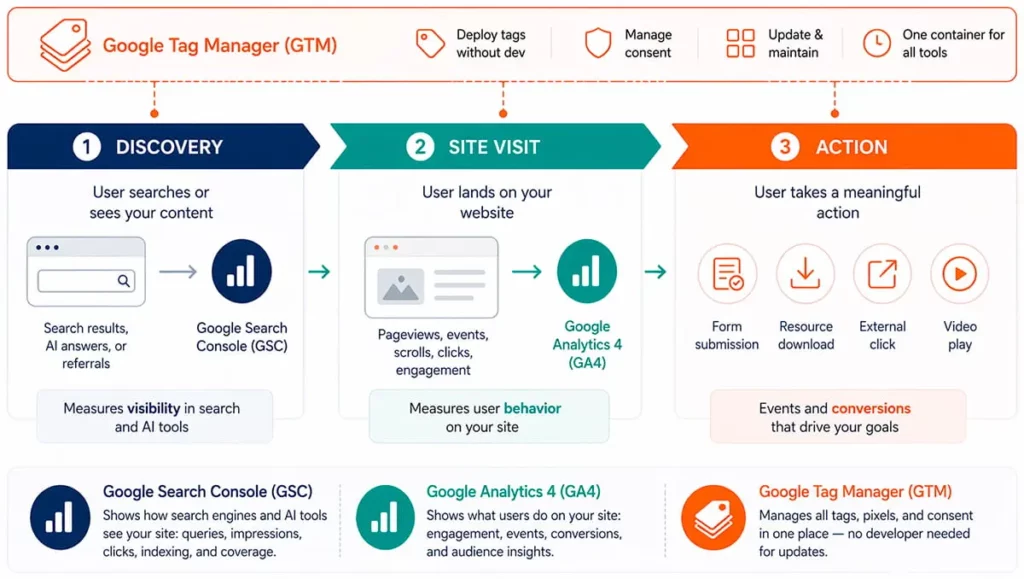
Alone, each tool is partial. Together, they describe the full journey from search query to on-site action. For a pharma or biotech company preparing for a funding round, a data readout, or a product launch, that journey is the difference between a website that can be optimized and one that can only be guessed at.
Frequently Asked Questions (FAQ)
Initial setup of all three tools takes approximately four to eight hours of configuration work for a typical corporate pharma or biotech site. This includes account creation, property configuration, tag deployment, goal and event setup, Search Console verification, sitemap submission, and basic consent logic. Sites with HCP portals, patient-facing areas, or PHI considerations require additional configuration time and often a separate HIPAA-compliant analytics layer alongside GA4.
Google Analytics is not inherently HIPAA compliant. A corporate pharma or biotech website focused on investors, pipeline information, and partnership inquiries typically does not contain PHI, and GA4 can be used on that type of site. The risk appears when sites add HCP portals, patient support programs, or condition-specific authenticated content. At that point, PHI considerations apply and GA4 must be configured with strict filtering or replaced with a BAA-covered alternative on those parts of the site.
Partially. Google Tag Manager is specifically designed to let marketing teams deploy analytics tags without developer involvement. However, the initial GTM container and GA4 base code still need to be installed on the site, which is a one-time developer or agency task. After that, ongoing event tracking, pixel deployment, and consent logic can be managed in GTM by a non-developer. Search Console verification is also typically a developer or agency task on first setup.
GA4 measures behavior on the site. Google Search Console measures how the site is discovered. A complete measurement setup uses both, because each answers a question the other cannot.
Setup can be handled by an in-house marketer or a general-purpose agency. Interpretation in a life sciences context usually benefits from a specialist. That means understanding what HCP search behavior looks like, how investor audiences differ from patient audiences, and which GEO signals matter for pharma queries in AI tools. Working with a pharma SEO agency that builds measurement-informed SEO and GEO strategy into every engagement ensures these tools are configured to answer the questions that drive life sciences marketing decisions.